
Last updated: October 2026
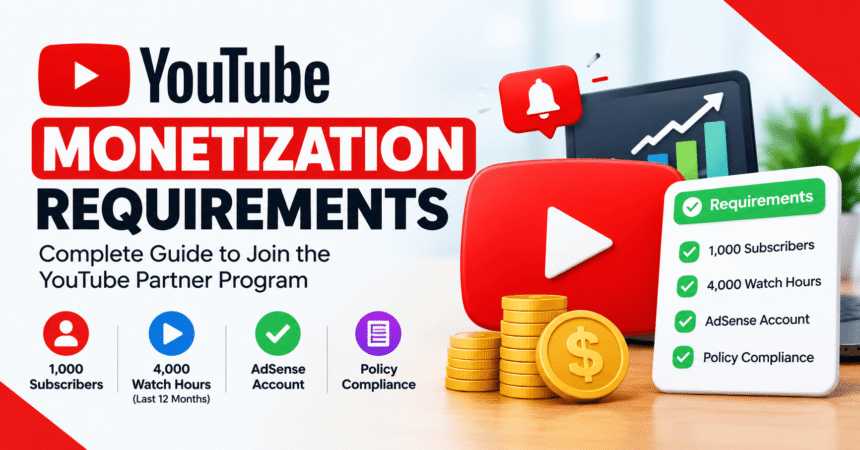
Quick answer: To earn ad revenue on YouTube today, your channel needs 1,000 subscribers plus either 4,000 public watch hours in the last 12 months or 10 million public Shorts views in the last 90 days, and it must follow YouTube’s monetization policies. A lower tier opens at 500 subscribers for fan-funding features in eligible countries. From 1 February 2027, new applicants for ad revenue will need 8,000 watch hours or 20 million Shorts views.
YouTube monetization is run through the YouTube Partner Program (YPP). This guide explains every requirement, what counts toward each number, how to apply, how long review takes and what the 2027 changes mean for you. If you have not started a channel yet, begin with our guide on how to create a YouTube channel and upload a video.
YouTube Monetization Requirements at a Glance
| Requirement | Early access tier (fan funding) | Full tier (ad revenue) |
|---|---|---|
| Subscribers | 500 | 1,000 |
| Public uploads | 3 in the last 90 days | Not required |
| Long-form watch hours | 3,000 in the last 12 months | 4,000 in the last 12 months |
| OR Shorts views | 3 million in the last 90 days | 10 million in the last 90 days |
| What it unlocks | Fan funding such as memberships, Super Chat and Shopping features, where available | Ad revenue sharing, YouTube Premium revenue and everything in the early tier |
You only need to meet one of the two view options in each column: watch hours or Shorts views. Watch hours and Shorts views are counted separately and do not combine. The early tier is only available in certain countries and regions, so check the Earn tab in YouTube Studio to see whether it applies to you.
Basic Requirements for Every Channel
Meeting the numbers is not enough. Every channel in the YouTube Partner Program must also:
- Follow the YouTube channel monetization policies, including rules on original and authentic content.
- Live in a country or region where YPP is available.
- Have no active Community Guidelines strikes.
- Turn on 2-Step Verification on the Google account.
- Link an approved Google AdSense account so YouTube can pay you.
What Counts as Watch Hours and Shorts Views?
Public watch hours
Only public watch time on long-form videos in the last 12 months counts. Private and unlisted videos do not count, and neither does watch time from deleted videos or from ads. Watch time on Shorts is not added to this number.
Public Shorts views
The Shorts route uses valid public views on your Shorts over the last 90 days. This number can differ from the view count shown on the dashboard, because YouTube counts qualified views for eligibility. Use the Earn tab in YouTube Studio for the figure that matters.
Subscribers
Subscriber count is shown on your channel and in YouTube Studio. Rounded public counts can differ slightly from the exact number.
What Changes on 1 February 2027
YouTube announced the first major update to its Partner Program entry terms since 2018 on 10 August 2026. Music Business Worldwide reported the details, and the official page is YouTube’s Partner Program overview and eligibility article.
| Ad revenue path for new applicants | Through 31 January 2027 | From 1 February 2027 |
|---|---|---|
| Subscribers | 1,000 | 1,000 |
| Public watch hours (12 months) | 4,000 | 8,000 |
| OR Shorts views (90 days) | 10 million | 20 million |
- The higher numbers apply to new applicants. Existing partners keep their YPP status.
- From 1 February 2027, a channel needs 10 million qualified Shorts views in the previous 90 days to earn ad and subscription revenue from Shorts, even if it is already in the program. Channels below that line stay in YPP and still earn on long-form content.
- Existing partners should review and accept the new terms in YouTube Studio before the deadline to keep earning from the features they use.
What to do: if you are close to the current thresholds, aim to qualify and apply well before 1 February 2027, because review can take about a month.
How to Check Your Progress in YouTube Studio
- Sign in to YouTube Studio.
- Open the Earn tab in the left menu.
- Check the progress bars for subscribers, public watch hours and Shorts views.
- If you are not eligible yet, select Be notified and YouTube will email you when you qualify.
How to Apply for the YouTube Partner Program
- Confirm that you meet the subscriber and watch hour (or Shorts view) thresholds.
- Turn on 2-Step Verification for your Google account.
- Open YouTube Studio > Earn and click Apply.
- Accept the base terms of the Partner Program.
- Connect or create an AdSense account and add your payment details.
- Wait for review. YouTube checks your channel against its monetization policies, and this usually takes around a month.
- Once approved, turn on the monetization features you want to use.
The complete official process is in the YouTube Partner Program overview and eligibility and the expanded YouTube Partner Program overview.
How YouTube Pays You
- Ads: a share of revenue from ads shown on your long-form videos.
- YouTube Premium: a share of subscription revenue when Premium members watch your content.
- Shorts: a share of revenue from the Shorts pool, subject to the Shorts rules above.
- Fan funding: channel memberships, Super Chat, Super Stickers and Super Thanks, where available.
- Shopping: product tagging and affiliate features for eligible creators.
Payments run through AdSense, and you are paid once your earnings reach the payment threshold for your country and your account details are verified. Income per 1,000 views varies widely by topic, audience location and season, so no fixed rate applies to every channel.
Why YouTube Rejects Monetization Applications
- Reused content. Videos that mainly copy other people’s work with little change are not eligible.
- Mass-produced or repetitive content. Large batches of near-identical videos can fail review.
- Policy violations. Misleading, harmful or inappropriate content can be rejected.
- Copyright problems. Using music, clips or images you do not own is a common cause.
- Active strikes. A Community Guidelines strike blocks approval.
If you are rejected, fix the problem described in the email and reapply after the waiting period shown in YouTube Studio.
How to Reach the Requirements Faster
- Pick a clear topic and serve one audience well.
- Create searchable titles, clear thumbnails and strong first 30 seconds so viewers stay longer.
- Use playlists and end screens to send viewers to your next video.
- Publish on a consistent schedule.
- Check your YouTube settings and keep your account secure with our account privacy settings checklist.
- Never buy subscribers or views. It breaks YouTube’s policies and can end your chance of joining YPP.
Keeping Monetization Once You Are In
YouTube may turn off monetization on channels that have not uploaded a video or posted to the Posts tab for six months or more. Keep your channel active, follow the policies and watch for policy emails. Be careful with scams too: fake “partner program” emails are common, so review our guide on how to spot a phishing email.
Frequently Asked Questions
What are the YouTube monetization requirements in 2026?
For ad revenue you need 1,000 subscribers plus 4,000 public watch hours in the last 12 months or 10 million public Shorts views in the last 90 days, a linked AdSense account, 2-Step Verification and no active strikes.
How many subscribers do you need to monetize on YouTube?
You need 1,000 subscribers for ad revenue. In eligible countries, 500 subscribers unlocks fan-funding features such as memberships and Super Chat.
How many views do you need to get monetized on YouTube?
There is no general view count. YouTube looks at subscribers and either public watch hours or Shorts views. The Shorts route requires 10 million views in 90 days.
Do Shorts views count toward the 4,000 watch hours?
No. Shorts views and long-form watch hours are separate routes. You can qualify with one or the other, but you cannot add them together.
How long does YouTube take to review a monetization application?
Review usually takes about a month, though timing can vary.
What is the new YouTube monetization requirement for 2027?
From 1 February 2027, new applicants need 1,000 subscribers plus 8,000 qualified watch hours or 20 million qualified Shorts views.
Will the 2027 change affect channels already in YPP?
Existing partners keep their status, but Shorts revenue will require 10 million qualified Shorts views in the last 90 days from 1 February 2027.
Can I monetize YouTube without 1,000 subscribers?
You cannot earn ad revenue without 1,000 subscribers, but you may get fan-funding features at 500 subscribers if the early tier is available in your country.
Do I need AdSense to get paid on YouTube?
Yes. You must link an approved AdSense account to receive payments.
Is there an age requirement?
You must be at least 18 or have a legal guardian manage your AdSense account to receive payments.
Can I earn money on YouTube without being in the Partner Program?
Not directly from YouTube. You can still earn from sponsorships, affiliate links and selling your own products, as long as you follow YouTube’s policies and disclosure rules.
Does YouTube pay for unlisted or private videos?
No. Only public videos count toward watch hours, and monetization applies to public content.
Can I lose monetization?
Yes. Policy violations, strikes or long inactivity can lead to monetization being turned off.
Related Guides
- How to create a YouTube channel and upload a video
- How to create a Gmail account
- YouTube settings you should change
- Productivity tools for creators
- Technology tutorials
Final Thoughts
The YouTube monetization requirements are clear: build an audience, earn public watch time or Shorts views, secure your account and apply through YouTube Studio. With the bar rising for new applicants on 1 February 2027, creators who are already close to 1,000 subscribers and 4,000 watch hours should apply as soon as they qualify. Always confirm the latest numbers in the official YouTube Help article, because the program can change.