
Last updated: October 2026
Quick answer: To create a Gmail account, go to the Google account sign-up page, click Create account > For my personal use, enter your name, birthday and gender, choose a unique @gmail.com username, set a strong password, verify your phone number if asked, add a recovery email and accept the terms. Your Gmail address and Google account are ready immediately, and it takes about five minutes.
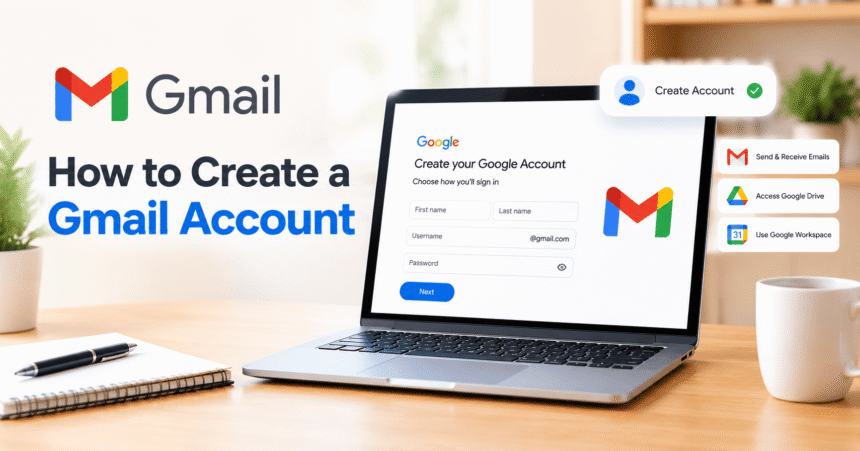
A free Gmail account is also a full Google account. It gives you email, Google Drive, Google Photos, Google Docs, Google Maps and access to YouTube. This guide shows how to sign up on a computer, Android phone and iPhone, how to pick a good username and how to secure your new account from day one.
What You Need Before You Start
- A phone, tablet or computer with an internet connection.
- Your real name and date of birth. Google uses your birthday to apply age rules.
- A phone number (sometimes requested for security and verification).
- Optional: another email address for account recovery.
- You should be at least 13 in most countries. Younger children need a parent-managed account through Google Family Link.
Key Facts at a Glance
| Question | Short answer |
|---|---|
| Is Gmail free? | Yes. A personal Gmail account is free. |
| How long does it take? | Usually about five minutes. |
| Free storage | 15 GB shared across Gmail, Google Drive and Google Photos. |
| Username rules | 6 to 30 characters using letters, numbers and periods. |
| Is a phone number required? | Sometimes. Google may ask for one to verify you are a real person. |
| Can I have more than one Gmail account? | Yes. You can create and switch between several accounts. |
| Minimum age | 13 in most countries. |
How to Create a Gmail Account on a Computer
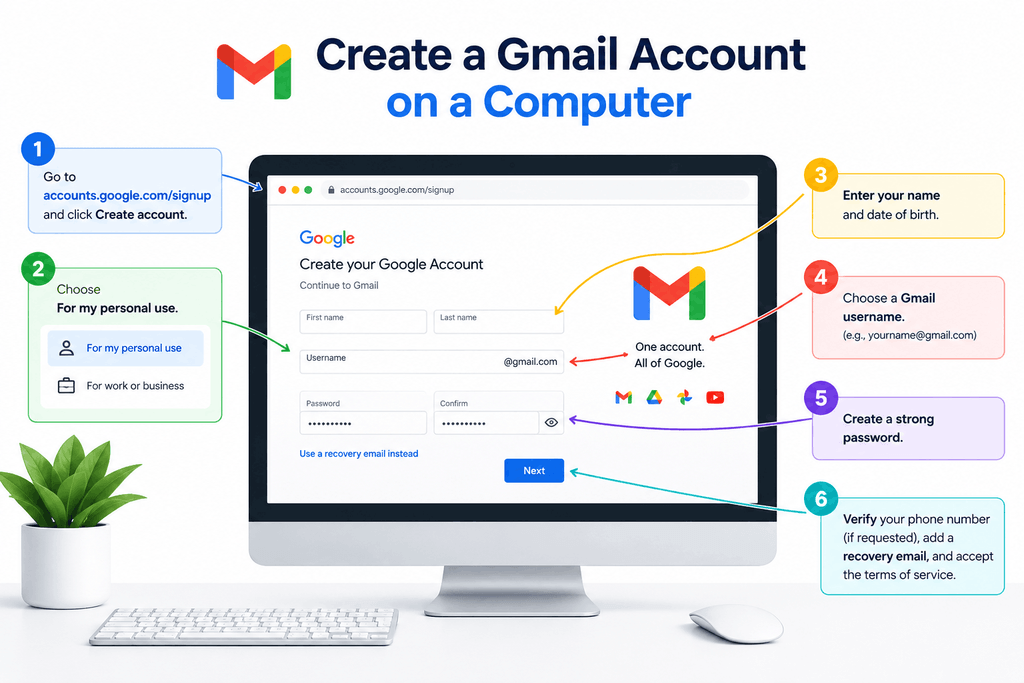
- Open accounts.google.com/signup, or go to Gmail and click Create account.
- Choose For my personal use (or To manage my business if it is for work).
- Enter your first and last name and click Next.
- Enter your birthday and gender, then click Next.
- Pick one of the suggested addresses or choose Create your own Gmail address. Type the username you want and click Next.
- Create a strong password and confirm it.
- If Google asks, enter your phone number and the verification code it sends.
- Add a recovery email address (recommended) and click Next.
- Review your account details, read the Privacy and Terms and click I agree.
When the last screen closes, you are signed in. Google also explains the process in its official guide to creating a Gmail account and in the Google Account sign-up help article.
How to Create a Gmail Account on Android
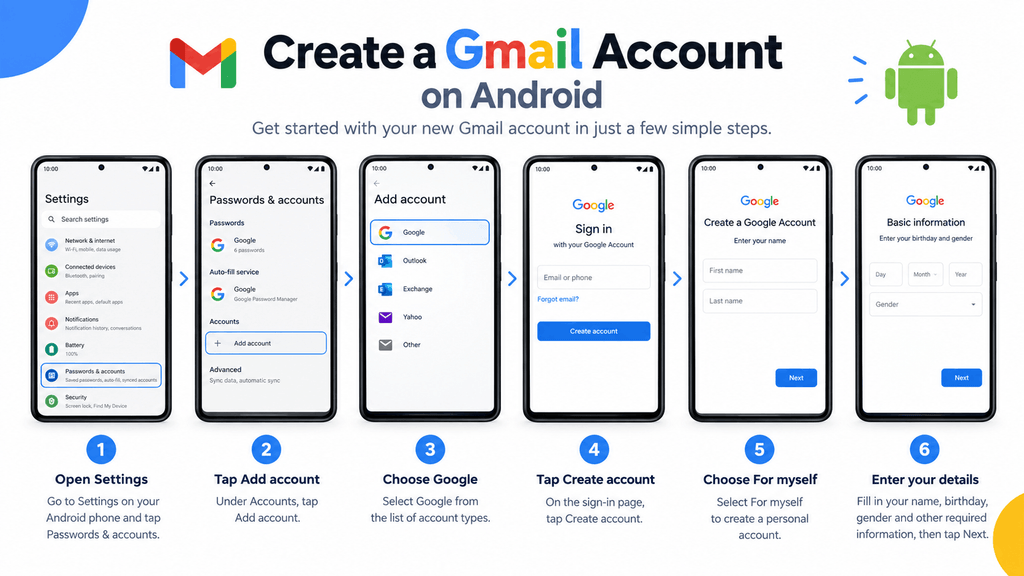
- Open Settings and tap Passwords & accounts (the name varies by phone, and some show Accounts).
- Tap Add account and choose Google.
- Tap Create account and choose For myself.
- Follow the prompts for name, birthday, username, password and phone verification.
- Accept the terms. Your new account is added to the phone, and you can open the Gmail app to start using it.
How to Create a Gmail Account on iPhone or iPad
- Download and open the Gmail app from the App Store.
- Tap your profile picture and choose Add another account (or tap Sign in on first launch).
- Select Google, tap Create account and choose For myself.
- Complete the name, birthday, username, password and verification steps.
- Accept the terms to finish.
You can also sign up in Safari at accounts.google.com/signup and then sign in to the Gmail app.
How to Choose a Good Gmail Address
- Keep it simple and professional. Use your name, such as firstname.lastname, for job applications and school.
- Avoid numbers that look random and nicknames you may outgrow.
- Remember the rules. Use 6 to 30 characters with letters, numbers and periods. Spaces, hyphens and underscores are not allowed. Periods do not change who receives the mail.
- Try variations if your first choice is taken, for example adding your middle initial or a short word related to your work.
- Read it aloud. If it is hard to say or spell, people will mistype it.
How to Create a Strong Password
- Use at least 12 characters, and never fewer than the 8 Google requires.
- Mix words, numbers and symbols, or use a long passphrase.
- Do not reuse a password from another site.
- Use a password manager to store it safely.
- Never share it, even with someone claiming to be Google support.
Secure Your New Gmail Account Right Away
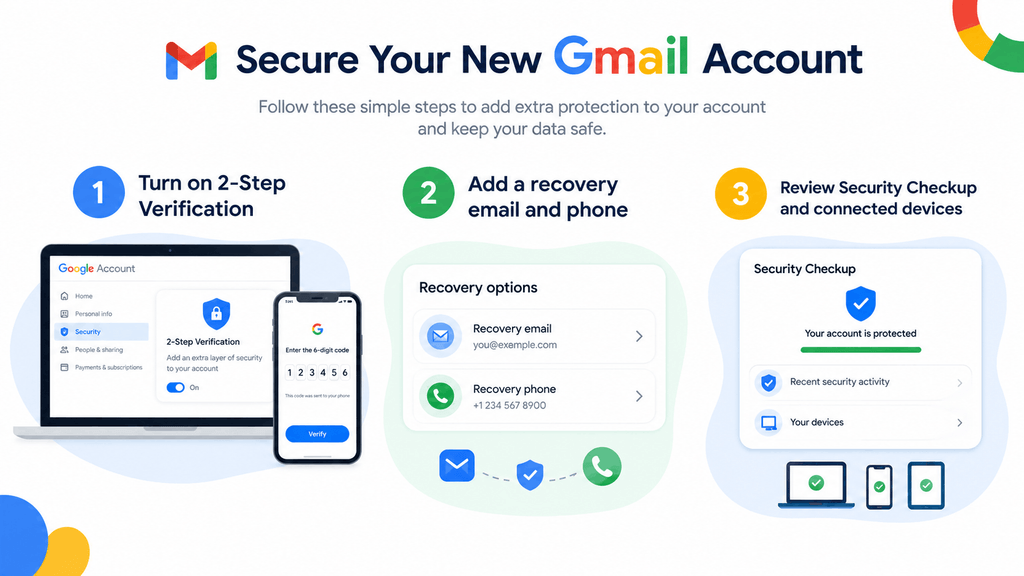
- Turn on 2-Step Verification in your Google account security settings. See Google’s guide to turning on 2-Step Verification.
- Add recovery info. A recovery phone and email help you get back in if you forget your password.
- Run the Security Checkup from your Google account page to review devices and connected apps.
- Review privacy options. Our account privacy settings checklist walks you through the important ones.
- Learn the warning signs of scams. Read how to spot a phishing email before you click any link.
What You Can Do With Your New Google Account
- Send and receive email with Gmail.
- Store files in Google Drive. New to storing files online? Read what cloud storage is and how it works.
- Write and share documents with Google Docs. Start with our beginner’s guide to Google Docs.
- Watch, subscribe and publish on YouTube. When you are ready, learn how to create a YouTube channel and check the YouTube monetization requirements.
- Back up photos with Google Photos and use Maps, Calendar and Google Play.
Troubleshooting: Common Gmail Sign-Up Problems
“That username is taken.”
Add a period, a middle initial or a short word, or choose one of Google’s suggestions.
I never received the verification code.
Check that the number is correct and has signal. Wait a minute, then request a new code. Try a different number if the problem continues.
Google says my phone number was used too many times.
A phone number can only verify a limited number of accounts. Use a different number or wait.
Google says I can’t create the account.
This can happen on shared networks, with a VPN, or after many attempts. Turn off the VPN, switch from Wi-Fi to mobile data, or try again later on another device.
I’m under 13.
A parent can create a supervised account for you with Google Family Link.
Frequently Asked Questions
How do I create a Gmail account for free?
Go to accounts.google.com/signup, choose Create account, enter your details, pick a username and password, verify if asked and agree to the terms. It costs nothing.
Do I need a phone number to create a Gmail account?
Not always, but Google often asks for one to verify you. If you see an optional phone field, you may be able to skip it. If it is required, you must enter a number that can receive a code.
Can I create a Gmail account without a Google account?
No. Creating a Gmail address creates a Google account at the same time. The two are linked.
Can I use my existing email address instead of Gmail?
Yes. On the sign-up page, choose Use my existing email instead of getting a new @gmail.com address. You still get a Google account.
How do I create a second Gmail account?
Click your profile picture in Gmail, choose Add another account and then Create account. You can switch between accounts from the same menu.
How much storage do I get with a free Gmail account?
You get 15 GB shared between Gmail, Google Drive and Google Photos. You can buy more with a Google One plan.
Can I change my Gmail address later?
In most cases you cannot change an @gmail.com username. You can create a new account and forward your mail, or change the display name that people see.
What is the minimum age to create a Gmail account?
The minimum age is 13 in most countries. It can be higher in some regions.
Is Gmail safe to use?
Gmail uses spam and phishing filters and encryption in transit. You make it safer by using a strong password, 2-Step Verification and caution with links and attachments.
How do I delete a Gmail or Google account later?
Follow our step-by-step guide on how to delete a Google account, and download your data first.
Do I need Gmail to use YouTube?
You need a Google account, and Gmail is the easiest way to get one.
Related Guides
- How to create a YouTube channel and upload a video
- YouTube monetization requirements
- Account privacy settings: how to protect every account
- How to spot a phishing email
- How to delete a Google account
- Technology tutorials
Final Thoughts
Creating a Gmail account is quick, free and the first step to using almost every Google service. Choose a clean username, protect it with a strong password and 2-Step Verification, and add recovery details so you never get locked out. For more help, visit the Gmail Help Center.